Minecraft resource pack guide
Fresh Animations Review: Minecraft Mobs With More Personality
A closer look at expressive villagers, farm animals and familiar hostile mobs.
Java Edition · 16×16 · by FreshLX
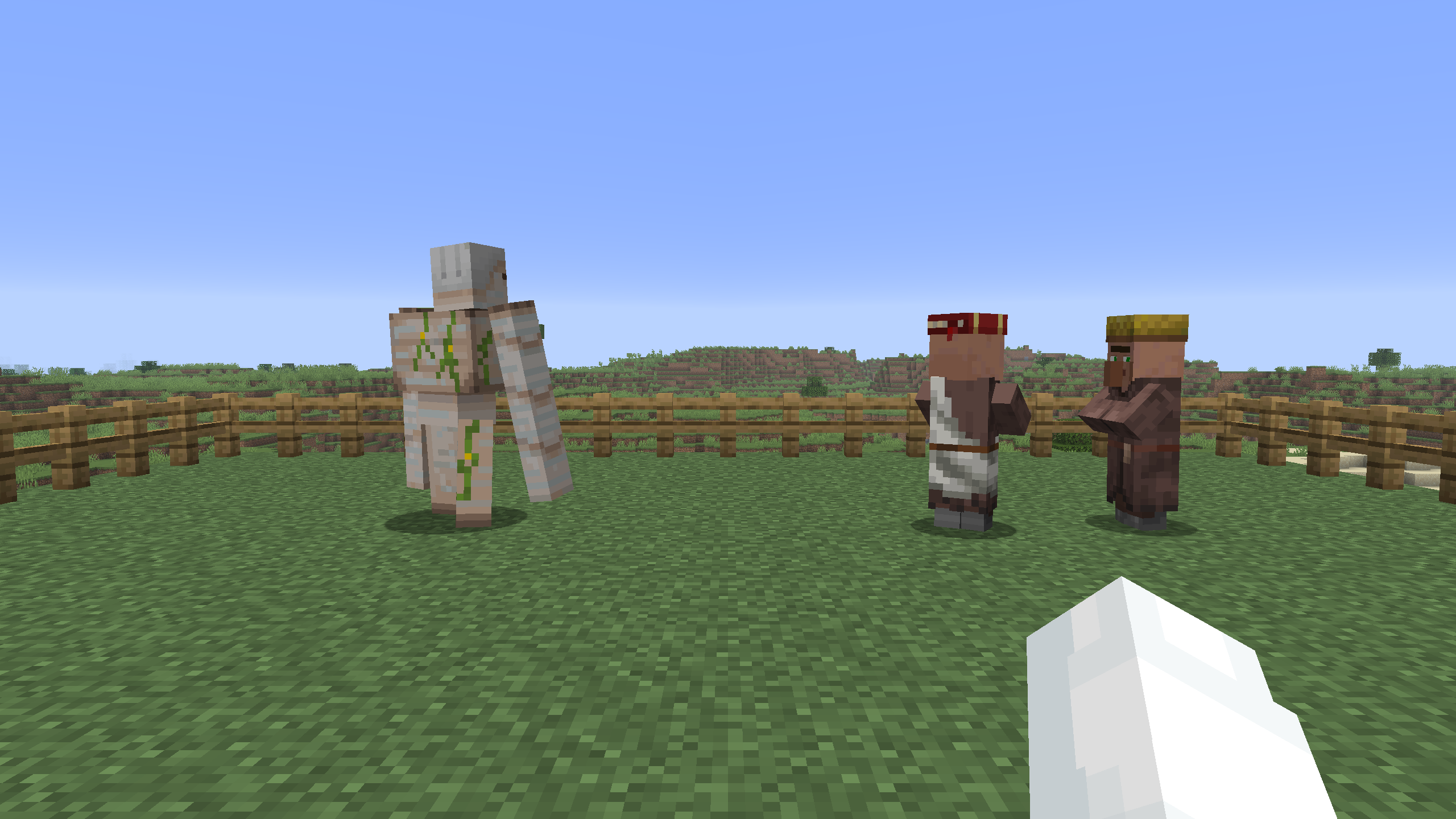
Fresh Animations keeps the familiar Minecraft look but gives mobs expressive poses, blinking eyes, and fluid walking cycles. Villagers and Iron Golems benefit most from the personality overhaul, while staying faithful to default textures.
In this guide6 sections
Fresh Animations is a different kind of makeover from Faithful 32x. The grass, fences and sky in my test still looked like ordinary Minecraft. Then a villager tilted his head, and the difference stopped being subtle.
I like this pack most when it gives familiar mobs a little more character without asking me to replace the rest of the game. There is a catch, though: its expressive style is a choice, not an automatic improvement over vanilla. Some of that stiff, slightly awkward movement is part of Minecraft's charm.
The villagers are the best introduction
The farmer and librarian made the strongest first impression. In the vanilla capture, their folded arms and upright bodies have that familiar, rather rigid look. With Fresh Animations enabled, the head angles and body poses are much more varied. They look less like the same figure turning on a spot.
The iron golem benefits in a different way. Its changed posture gives that huge blocky body more weight. I would not install a whole visual overhaul just to improve a golem, but beside the villagers it makes the scene feel more lively while keeping the recognizable silhouettes.
This is also why a screenshot only tells half the story. A still frame can show a tilted head or a bent leg, but it cannot show how one pose moves into the next. The clip below puts vanilla and Fresh Animations side by side. These are separate recordings in the same pen, not synchronized mob positions.
A small animal pen becomes more interesting
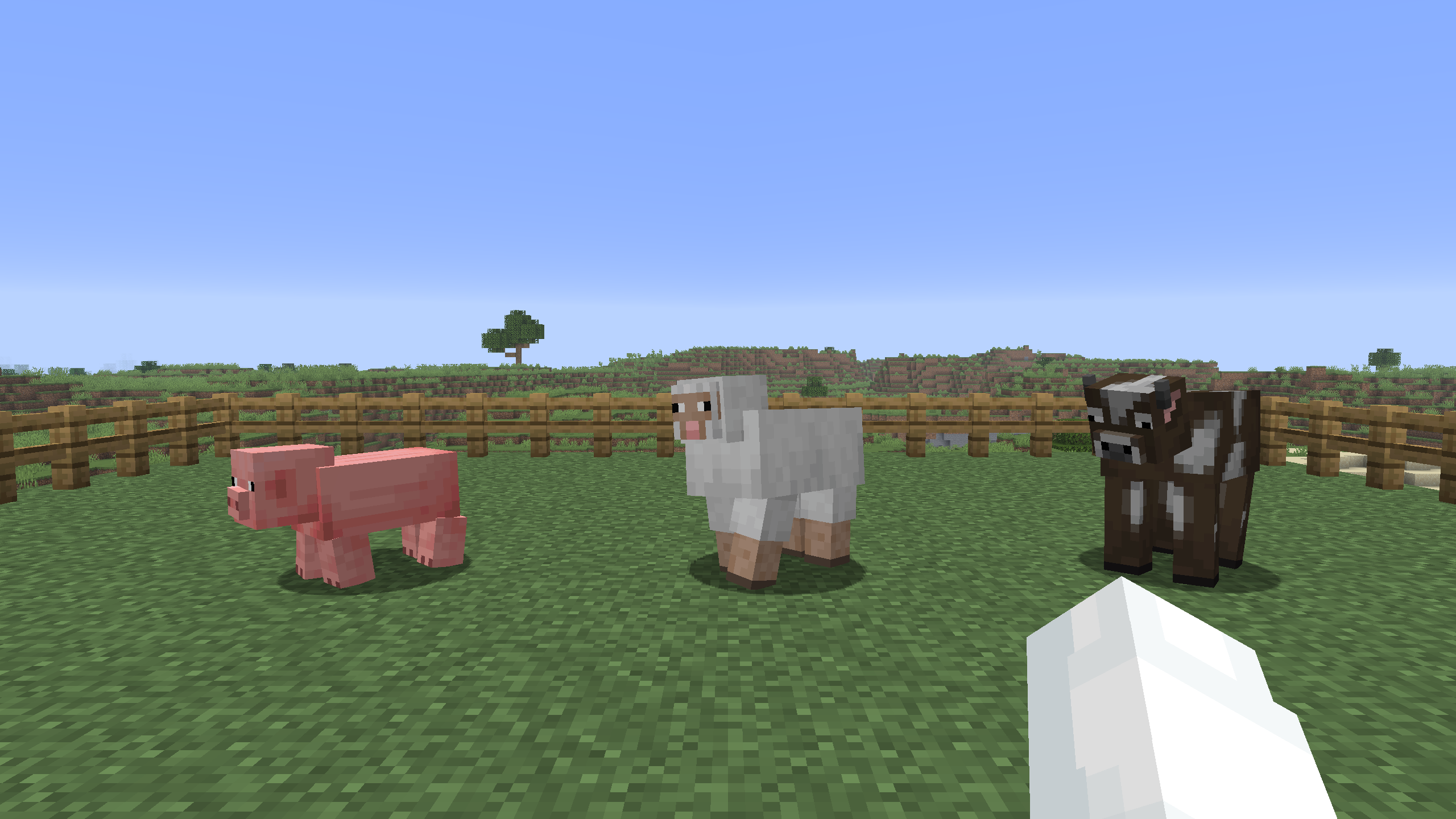
The sheep was my favorite of the three farm animals. Its bent legs and head movements give it a softer, less rigid feel, even though the wool is still built from very Minecraft-looking blocks. The pig and cow keep their familiar colors and proportions, so the change does not feel like dropping creatures from another game into the world.
That restraint matters to me. I can keep a plain survival world and still notice something new when I look into a pen. This pack does not need a dramatic landscape, glossy lighting or a redesigned inventory to make its point.
I would still choose vanilla if I wanted the quietest possible visual style. The added movement draws attention to animals that used to fade into the background. I enjoy that in a small pen; someone who likes the original stiffness may find the extra personality unnecessary.
Hostile mobs keep their identity
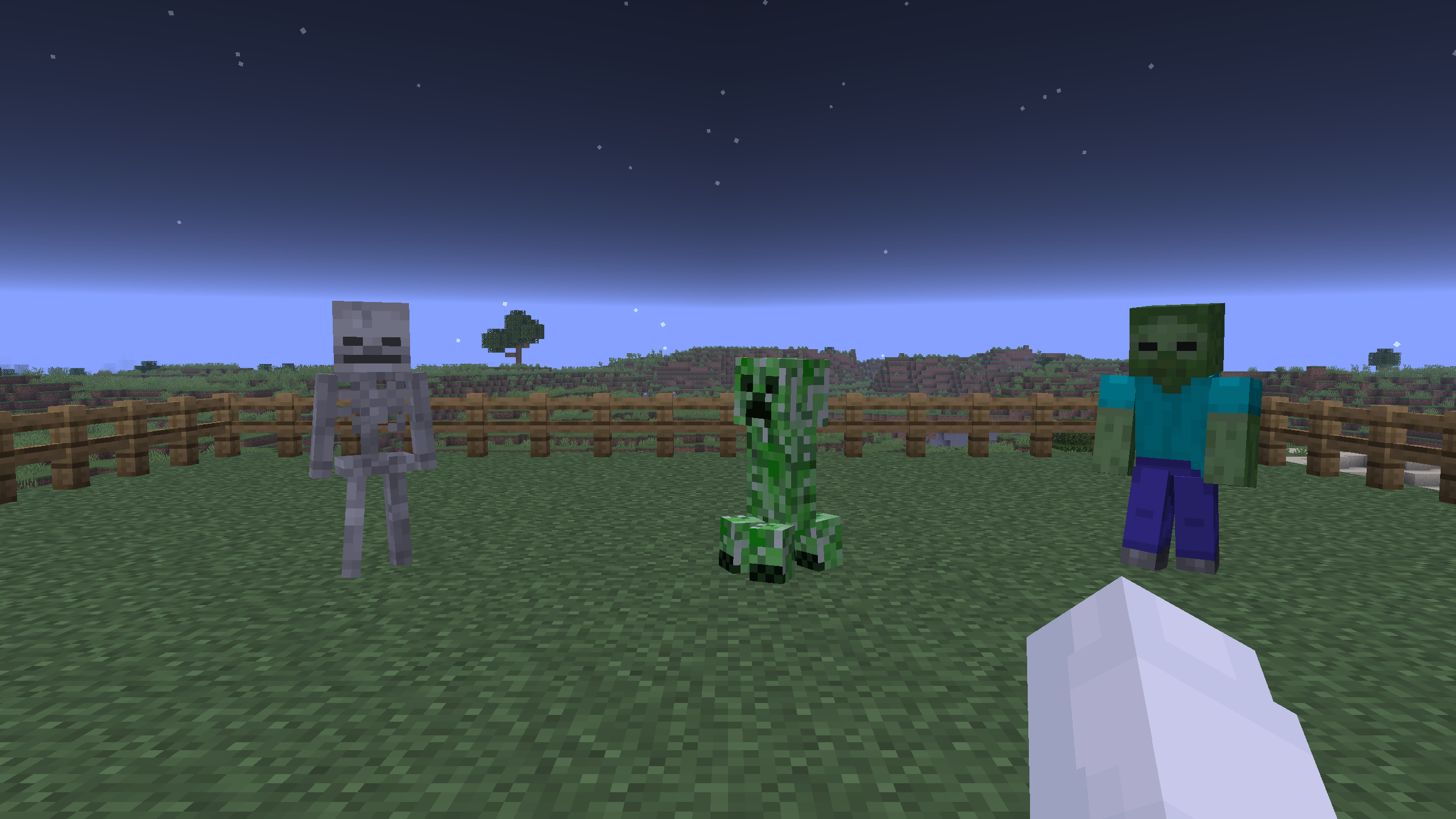
I also tried a zombie, creeper and skeleton at night, using Night Vision so the models were easy to see. Their shapes and colors remain immediately recognizable. The appeal is the new posing and movement, not a darker texture or a shader effect.
For me, the creeper is a useful test of whether this style still feels like Minecraft. Its outline is simple enough that extra movement stands out quickly. I like the extra expression, but I can also see why a player might prefer its original, unsettling simplicity.
These clips show idle and walking behavior. I did not test every attack, every mob or every variant, so I would not use this review as proof that the entire bestiary has been replaced.
The setup is less simple than a normal texture pack
My working setup was Minecraft Java 26.2 on Fabric, Fresh Animations 1.10.5, Entity Model Features 3.3.8 and Entity Texture Features 7.2.4. Sodium was installed for rendering, with no shaders or additional visual packs. The sampled mobs had visible eyes and loaded models; I did not need to tune EMF or ETF settings for these captures.
To reproduce that setup:
- Install matching Fabric builds of Entity Model Features and Entity Texture Features in the instance's
modsfolder. - Put the Fresh Animations ZIP in
resourcepacks, without extracting it. - Enable it under Options > Resource Packs, then check a villager or sheep in a world.
The pack's official page also describes an OptiFine route. I used EMF and ETF, not OptiFine. Pick files for your own Minecraft version rather than copying my version numbers into a different instance.
If another pack changes mob models, start by testing Fresh Animations on its own. A blank face or unchanged animation is a reason to check the supporting mods and pack conflicts, not to keep adding unrelated fixes. This Java pack is not a Bedrock download, and its base release does not turn it into a player-animation pack.
Would I keep it installed?
Yes, for a vanilla-looking world where I want villagers and animals to feel a little less mechanical. The villagers are the clearest reason to try it, and the sheep convinced me that the smaller changes are worth noticing too.
I would skip it if I wanted Minecraft to look and move exactly as I remember it, or if I only wanted a drag-and-drop texture change with no supporting mods. It is also the wrong choice for someone expecting sharper blocks or a new GUI. Faithful 32x tackles that side of the game instead.
I have not measured a repeatable FPS difference, so there is no performance promise attached to this recommendation. What I can recommend is the visual result in the scenes above: familiar mobs with more expressive poses, without replacing the world around them.
Our test setup
| Game | Minecraft Java Edition 26.2 |
|---|---|
| Pack | Fresh Animations 1.10.5 |
| Loader and rendering | Fabric Loader 0.19.3; Fabric API 0.158.0+26.2; Sodium 0.9.1 |
| Required model and texture support | EMF 3.3.8; ETF 7.2.4, matching Fabric 26.2 builds |
| Captures | 2560 × 1440 source capture; no shaders or other visual packs; first-person view |
| Scenes | Farmer, librarian, iron golem, pig, sheep, cow, zombie, creeper and skeleton; ordinary AI with short navigation routes |
| Comparison | Vanilla and Fresh village takes use the same rendering stack and pen, but mob positions are not synchronized |
| Night scene | Night Vision enabled; walking and idle behavior only |
| Limits | No FPS benchmark, Bedrock test, full bestiary audit or player-animation add-on test |
Download and install
Choose the Java Edition file for your exact game version on the creator’s page. In Minecraft, open Options → Resource Packs → Open Pack Folder, place the ZIP there, then move the pack into the selected column.
The download is hosted by the creator, not MC Toolbox. Check the file and version before installing.
Common questions
Can I use Fresh Animations with Sodium?
Our Java 26.2 test used Sodium together with EMF and ETF. Sodium alone does not provide the model support used by this pack.
Does the download work on Bedrock?
This article covers the official Java resource pack. Do not install its ZIP as a Bedrock pack.
Will it change blocks or the inventory?
The focus is mob models and animations. Our blocks and interface retained their default appearance.