








Guide Index5 sections
It is almost impossible to imagine playing modded Minecraft without Just Enough Items (JEI). Sitting quietly on the right side of your inventory screen, JEI is the universal index for every block, item, potion, and crafting recipe loaded in your game.
Beyond simply clicking an item to view its recipe, JEI contains powerful search operators, bookmarking shortcuts, and inventory sync features that save hours of trial and error. Here is the complete power-user guide to searching by mod ID, tag, and tool class.
How JEI Visualizes Different Recipe Categories
From standard 3x3 crafting to smelting, brewing, and anvil combining.
JEI does not just display standard 3x3 crafting tables. Available recipe categories depend on your Minecraft version, installed mods and their JEI integration:
- Crafting Table (Shaped & Shapeless): Displays exact 3x3 slot placements or shapeless ingredient combinations, cycling through valid tag alternatives (such as any plank or ingot).
- Furnace, Blast Furnace, Smoker & Campfire: Shows required smelting times, experience yields, and valid fuel burn durations.
- Brewing Stand Potion Trees: Maps out base awkward potions, reagent upgrades, redstone duration extensions, glowstone potency tiers, and splash/lingering conversions.
- Smithing Table Upgrades & Armor Trims: Lists template requirements for Netherite equipment upgrades and the armor trim patterns and materials available in your version.
- Anvil Combining & Repair Costs: Calculates enchantment book combinations and raw material unit repairs (such as diamonds for diamond gear).
- Modded Processing Machines: Mods can add JEI categories for their machines and cooking stations. These appear when the installed mod version or an integration addon provides them.
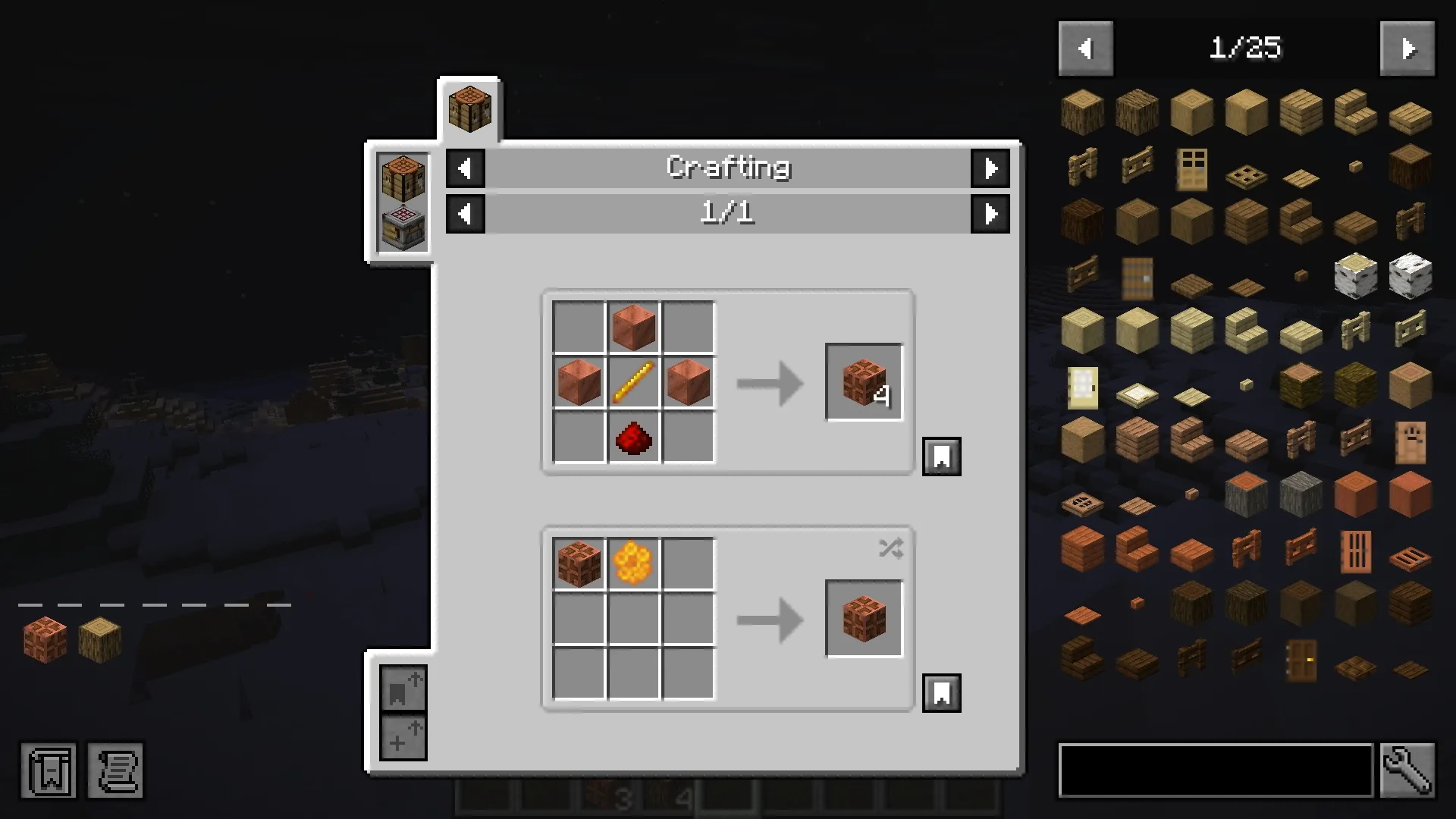
Hover over any item in your inventory or in the right-hand JEI item list and press R (or Left-Click) to inspect every recipe that produces it. Pressing U (or Right-Click) flips the query in reverse, showing every recipe and workstation where that item serves as an input ingredient. Clicking the category header title at the top of the recipe window lists all recipes supported by that specific workstation.
When you have a crafting table or modded machine open, click the small [+] transfer button beside a recipe to pull matching ingredients straight from your inventory into the crafting grid. Holding Shift while clicking [+] transfers ingredients for multiple crafts, limited by available materials and the supported grid. Moving ingredients into the grid is separate from taking the crafted result.
Mastering the Search Bar with Search Prefixes
Filter through 10,000+ modded items in seconds using prefix operators.
For JEI on Minecraft 26.3, use the prefixes below to narrow your search. Older JEI versions can assign different prefixes, so check the search settings in your installed version if a filter behaves differently. Searches also depend on whether that search mode is enabled.
| Prefix | Function | Example Query | What It Finds |
|---|---|---|---|
| @mod | Search mod names | @minecraft | Ingredients from Minecraft |
| #tag | Search ingredient tags | #c:ingots | Ingredients carrying a matching tag, if present in the pack |
| $tooltip | Search tooltip text | $damage | Ingredients whose searchable tooltip contains damage |
| %tab | Search Creative inventory tabs | %combat | Ingredients in a matching Creative tab |
| &id | Search ingredient IDs | &minecraft:stone | Ingredients with a matching ID |
| | (OR) | Match either search group | diamond | netherite | Results matching diamond or netherite |
| - (NOT) | Exclude a search term | ore -deepslate | Ore results excluding deepslate |
Keyboard Shortcuts and Mouse Controls Cheat Sheet
Master these essential keybinds to speed up your crafting workflow.
| Key / Action | Default Binding | Functionality |
|---|---|---|
| Show Recipe | R (or Left-Click) | Opens the crafting recipes that create the hovered item. |
| Show Uses | U (or Right-Click) | Shows every recipe that uses the hovered item as an ingredient. |
| Bookmark Item | A | Pins the hovered item/recipe to the left bookmark sidebar. |
| Focus Search Bar | Ctrl + F | Immediately jumps typing focus into the search bar. |
| Toggle Cheat Mode | Ctrl + Click Wrench | Allows 1-click grabbing of full stacks directly from the catalog. |
| Auto-Fill Crafting Grid | Shift + Click [+] | Transfers ingredients for multiple crafts into a supported grid; it does not automatically take the crafted output. |
Multiplayer Servers & Minecraft 1.21+ Recipe Sync
Why JEI should be installed on both client and dedicated server.
Starting from Minecraft 1.21.2, Mojang redesigned the underlying recipe network protocol. On multiplayer servers:
- Modded Servers (Forge / NeoForge / Fabric): Installing JEI on both the server and client synchronizes custom datapack recipes, modded machine processing tabs, and one-click
[+]recipe transfer buttons for all connected players. - Pure Vanilla Servers: When joining a vanilla multiplayer server where server mods are not installed, JEI runs in client-only mode, reading synced vanilla recipe books and allowing full item search and bookmarking.
- Bookmarking Multi-Step Builds (
AKey): PressAwhile hovering over any item or open recipe tab to pin it to the left-hand bookmark sidebar. Bookmarked recipes let you track complex multi-stage crafting trees without re-typing searches.
Crafting Recipes


Piston
Pressing R on any item displays its exact 3x3 pattern. Click any ingredient to view how to make that ingredient.
Official Downloads
Created by mezz610M+ downloads
JUST ENOUGH ITEMS (JEI)
We do not host any Minecraft mod files directly on this site. We link to official sources to ensure mod developers receive proper credit and support for their work.