








Guide Index6 sections
A large Minecraft pack can occupy a surprising amount of Java heap before you have built a base or explored very far. Thousands of added block states and models have to be represented somewhere. FerriteCore targets that standing memory cost. It does not add a menu, item, or new gameplay rule: install the matching JAR and the optimizations run in the background.
That makes it useful when a pack is close to its heap limit or when a server carries a broad catalog of modded blocks. It is less relevant if the real problem is a slow GPU, low server tick rate, or a single mod that steadily leaks memory.
What FerriteCore changes under the hood
FerriteCore replaces several memory-hungry ways Minecraft stores repeated data. Its technical documentation explains compact lookup structures for blockstate neighbors, reuse of equivalent state and model data, and less duplication in cached shapes. A pack with many blocks and properties creates more of this data, which is why the benefit depends on the pack rather than on a universal percentage.
The author gives a historical All of Fabric 3 example that fell from 1,792 MB to 984 MB of heap after a controlled world-load period. That is an illustration of one older pack, not a result to expect from every modern install. A small vanilla-like instance may show a much narrower difference.
Install the build that matches your loader and game version
The Modrinth project offers Fabric, Forge, NeoForge, and Quilt builds across different Minecraft releases. Do not treat those files as interchangeable. The Fabric 9.0.0 JAR is listed for Minecraft 26.1 through 26.3; older game versions use other builds. The JAR itself lists Fabric Loader and Minecraft as required dependencies, not Fabric API.
- 1
Choose the exact version and loader
On Modrinth, filter by your Minecraft version and Fabric, Forge, NeoForge, or Quilt. Download that matching FerriteCore JAR.
- 2
Place the JAR in the relevant mods folder
For a client, use the mods folder of the launcher profile you actually play. For a dedicated server, place the server-compatible build in that server's mods folder.
- 3
Launch once before changing other mods
Check the loader's mod list or startup log for FerriteCore. If a pack fails to start after adding it, confirm the version and loader first, then isolate the interaction by testing a minimal profile.
Client, server, or both?
FerriteCore is listed for both client and server use. Client-side changes can reduce the memory occupied by rendering-related state and model data; server-side optimizations address data the server also keeps in memory. If you control both sides of a modpack, use the appropriate build on both. If you only control your client, you can still install the client build without assuming the server's memory use will change.
This is a memory mod, not a replacement for Sodium's rendering work or for a server-tick optimizer. Combining optimization mods can make sense, but add or update them one at a time. When startup becomes slow or a mixin fails, the exact Minecraft version, loader, and mod combination matter more than a generic compatibility label.
Read the heap display before judging the result
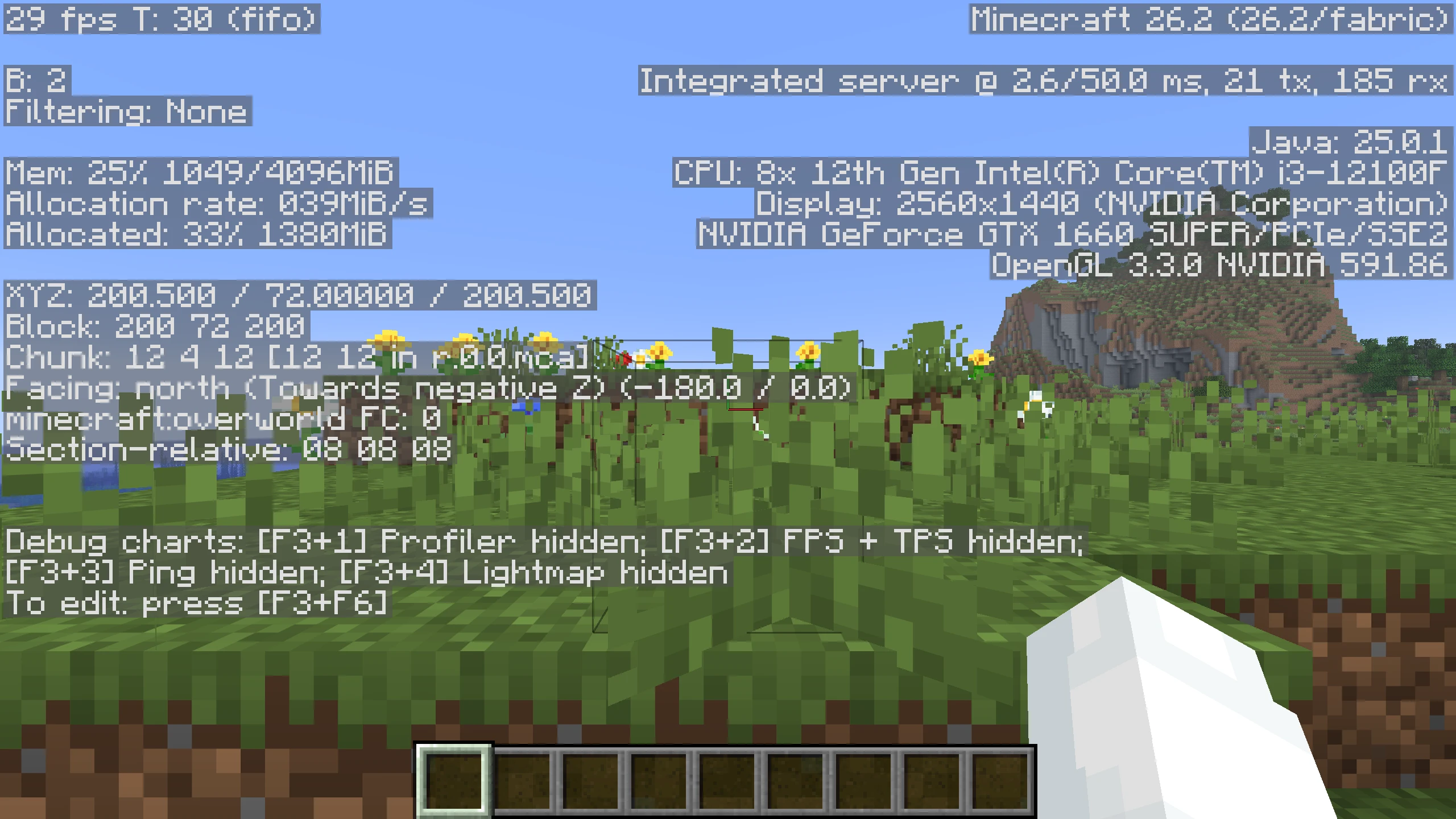
Minecraft's debug overlay shows used memory and allocated heap. Those numbers move as Java allocates objects and garbage collection clears them; a single screenshot is not a benchmark. The maximum heap you assign in the launcher is a ceiling, not a promise that the game will use or save that amount. Windows Task Manager also measures a different, broader process footprint.
To compare a pack fairly, keep the same Minecraft build, loader, mod list apart from FerriteCore, heap limit, world, view distance, and position. Let both runs settle after loading, then observe several readings rather than choosing the most flattering instant. FerriteCore is doing its job when a comparable pack needs less heap for the same content, even if the FPS counter barely moves.
When FerriteCore is the wrong fix
Do not install it expecting a fixed FPS boost. Fewer resident objects may ease pressure on a tight heap, but a graphics bottleneck or an overloaded server thread needs a different diagnosis. FerriteCore is also not a universal cure for a memory leak: if usage keeps climbing without returning after normal garbage collection, identify the leaking mod or feature.
For a block-rich pack running close to its memory budget, FerriteCore is a sensible, low-friction optimization. Its strength is making the same game data occupy less space; the honest outcome to look for is a healthier heap margin, not a magical frame-rate number.
Official Downloads
Created by malte0811Memory optimization
FERRITECORE
We do not host any Minecraft mod files directly on this site. We link to official sources to ensure mod developers receive proper credit and support for their work.