








Guide Index6 sections
Distant Horizons replaces Minecraft's fog-bound horizon with simplified level-of-detail (LOD) voxel geometry, allowing render distances of 256 chunks or more without crushing frame rates. In standard vanilla Minecraft, setting your render distance to 8 chunks restricts your vision to just 128 blocks in every direction. Standing on a high mountain summit under vanilla settings surrounds you with an opaque wall of white fog, hiding mountains, oceans, and valleys that exist just beyond chunk range. Distant Horizons solves this by generating low-polygon representations of distant terrain using background worker threads, rendering those simplified meshes directly on your graphics processor using OpenGL or Vulkan. Instead of loading thousands of full block entities and running chunk logic across thousands of blocks, the mod draws lightweight terrain contours across distances of 4,096 blocks or more.
Starting in Minecraft 1.20.6 and continuing through 1.21.x and 26.3, Distant Horizons distributes a single unified JAR file (DistantHorizons-3.3.4-26.3-fabric-neoforge.jar) that boots on both Fabric and NeoForge. It bundles the required Fabric API modules internally, and pairs best with a modest 8- to 12-chunk vanilla render distance while Distant Horizons handles the outer 64 to 256 chunks.
Comparing vanilla view distance to 256-chunk LODs
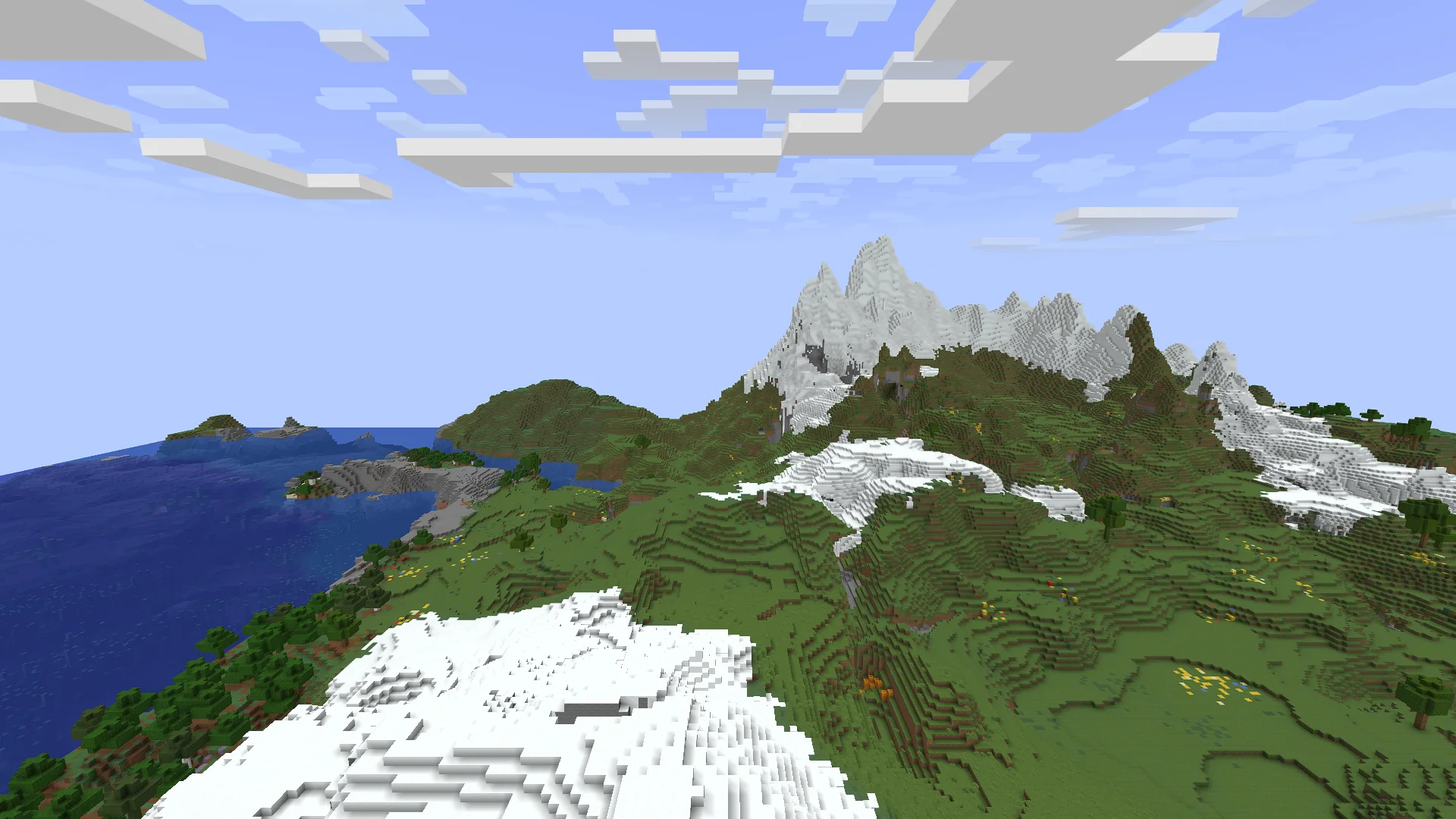
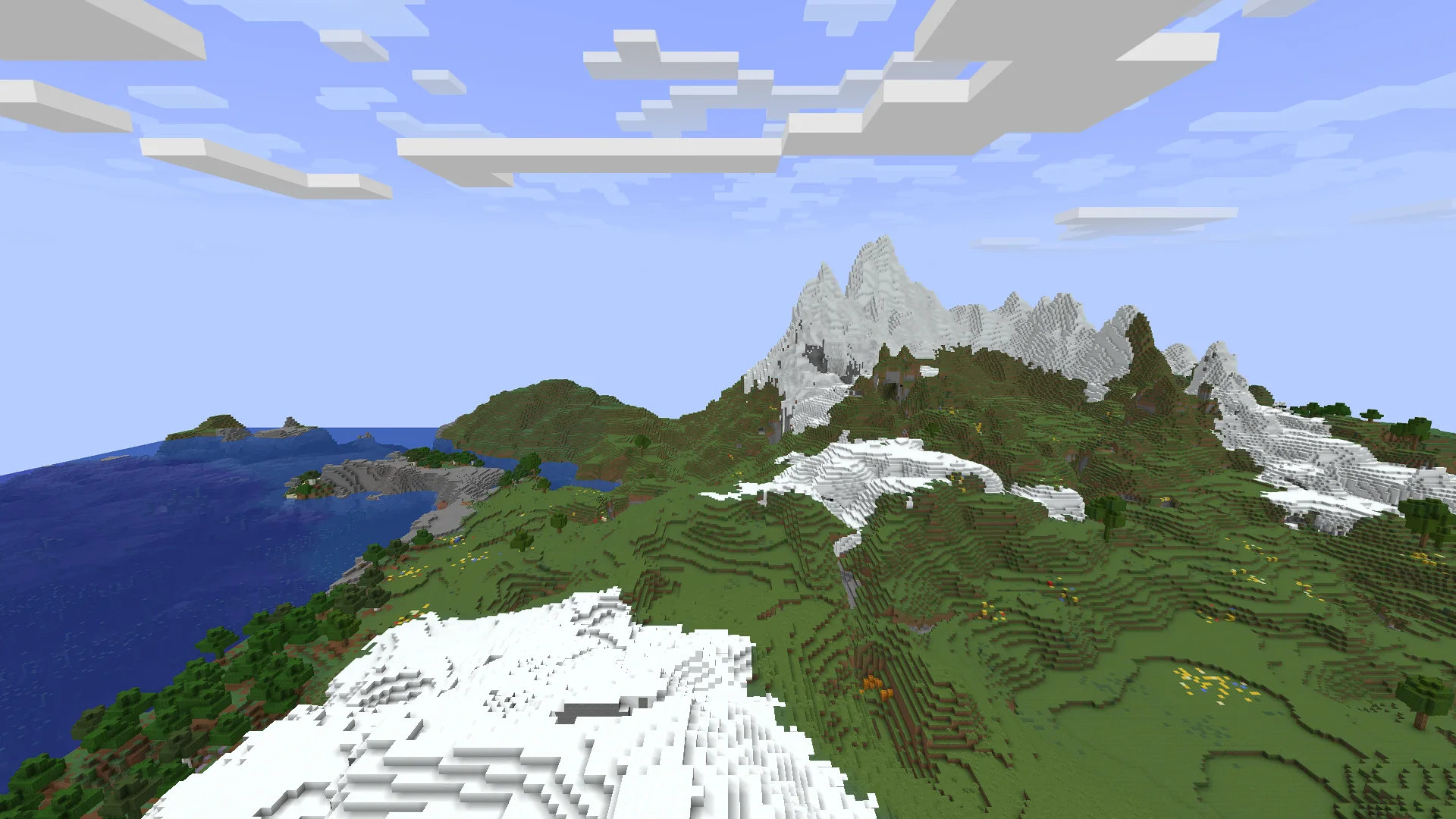
To evaluate the visual transformation, we positioned our spectator camera on a high snowy mountain ridge at coordinates -976, 160, 944, facing directly south under clear noon skies. With Distant Horizons active at its default 256-chunk LOD radius, the panorama opened up completely. The foreground snow cap and grassy foothills led down into a vast bay, while towering snow-capped mountain peaks rose across the distant skyline thousands of blocks away. Vanilla clouds drifted naturally across the sky above the distant terrain, giving the world realistic geographic scale that standard Minecraft rendering cannot achieve without severe performance drops.
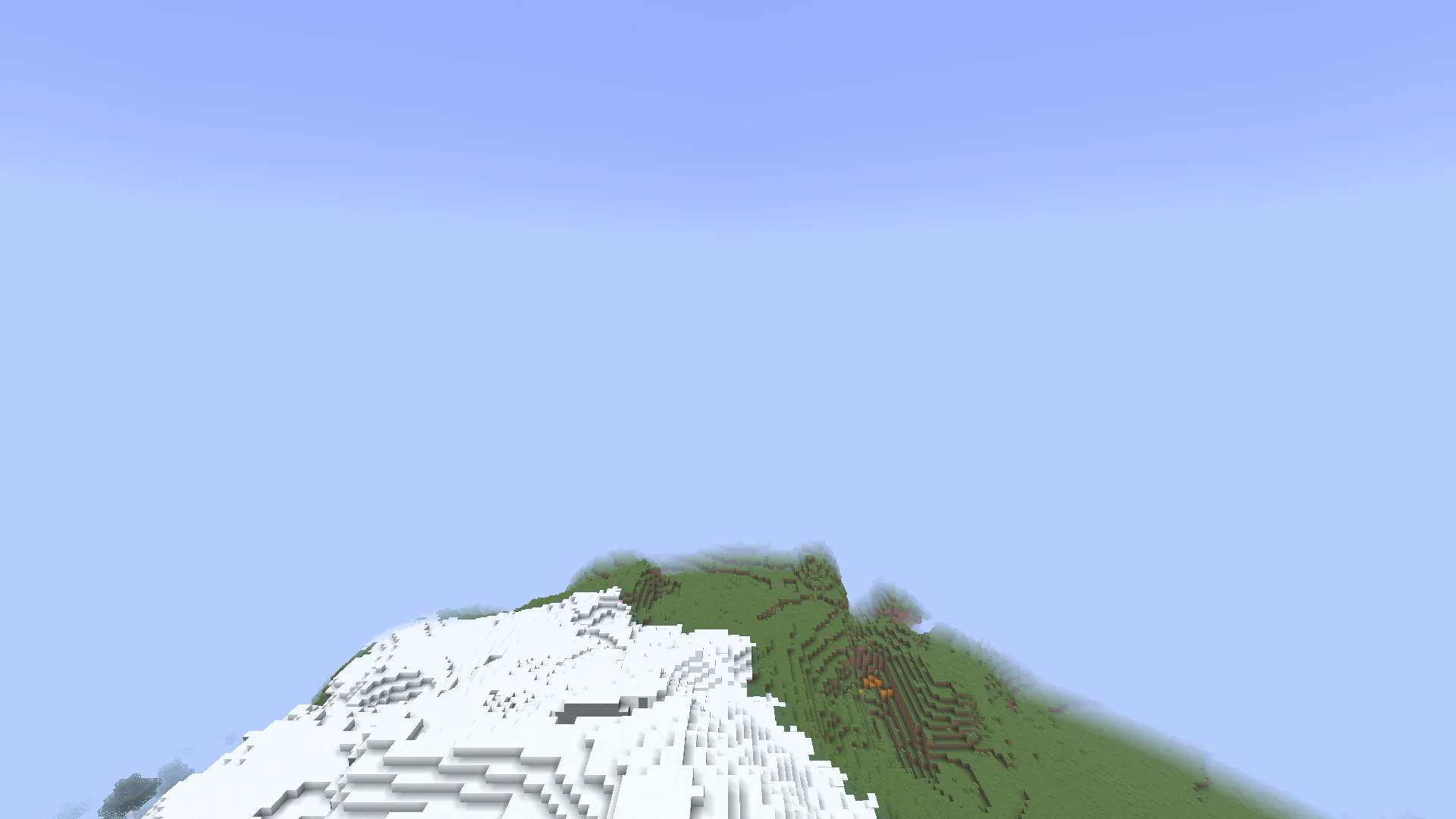
Toggling Distant Horizons off from the configuration screen demonstrated how much information vanilla Minecraft conceals. At the identical coordinate and viewing angle, vanilla chunk fog cut off visibility at exactly 128 blocks. The distant snow ranges, the coastline, and the expansive foothills vanished behind a pale fog gradient. In the frames, nearby terrain looks the same in both states; the LOD terrain starts where vanilla chunks end, and we could not see a hard seam between them.
Measured generation time and memory footprint
Terrain generation speed is a critical factor when using Distant Horizons, as generating distant LOD geometry requires substantial background CPU work. On quad-core processors using Balanced CPU load, distant mountain ranges and horizons populate steadily within seconds of arriving at a panoramic viewpoint, allowing players to survey dozens of square kilometers without stuttering active movement.
Distant Horizons stores generated LOD data in a dedicated world database folder on your local drive. This means that terrain is only generated once per area. When we returned to our viewpoint after flying away, the LOD geometry loaded immediately from the local cache rather than recalculating chunk data. For memory allocation, we assigned 6 GB of RAM (-Xmx6G) using Java 25. The mod operated smoothly within this envelope during our singleplayer tests, but larger render distances or aggressive world exploration will increase memory consumption as the LOD cache expands.
Distant Horizons configuration settings
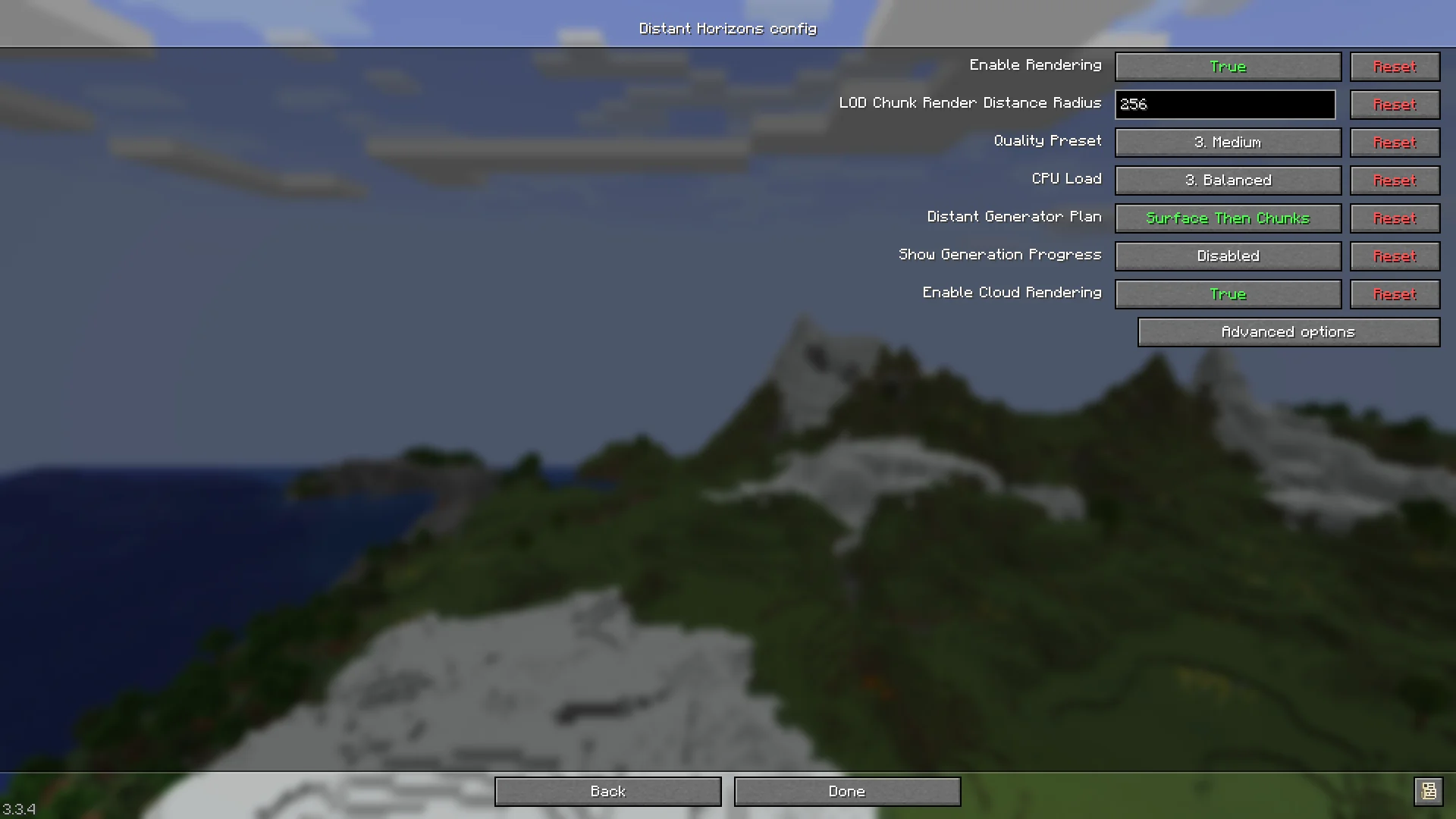
Opening the settings menu brings up the Distant Horizons config screen. The interface exposes key controls that let you balance visual fidelity against processor overhead. The primary options displayed on the settings screen include:
| Option | Default Value | Description |
|---|---|---|
| Enable Rendering | True | Globally enables or disables Distant Horizons LOD rendering without requiring a game restart. |
| LOD Chunk Render Distance Radius | 256 | Sets how far, in chunks, LOD terrain is drawn. |
| Quality Preset | 3. Medium | Controls the geometric resolution and voxel density of distant terrain meshes. |
| CPU Load | 3. Balanced | Regulates how many background CPU threads and processing cycles are allocated to LOD generation. |
| Distant Generator Plan | Surface Then Chunks | Chooses how distant terrain is generated; the default generates the surface first, then full chunks. |
| Show Generation Progress | Disabled | Toggles an on-screen visual overlay showing background LOD generation status. |
| Enable Cloud Rendering | True | Renders Minecraft clouds across distant LOD chunks to maintain consistent atmospheric depth. |
| Advanced options | Submenu | Opens the advanced settings. |
Preventing stutters and tuning background load
Because Distant Horizons creates and destroys thousands of voxel mesh objects while generating terrain, garbage collection behavior has a direct impact on frame smoothness. When starting the game with standard Java arguments, Distant Horizons issues an explicit in-game notification: "Distant Horizons: G1 Garbage collector detected. This can cause FPS stuttering. It's recommended to use a concurrent garbage collector like ZGC (Java 21+) or Shenandoah (Java 8 through 17) for a smoother experience. This warning can be disabled in the DH config." To follow that advice on Java 21 or newer, add -XX:+UseZGC to your launcher's JVM arguments. Adding -XX:+UseZGC (and -XX:+ZGenerational on Java 21+) keeps frame pacing smooth while background threads build LOD meshes.
Hardware sizing also plays a major role in stutter prevention. According to the official documentation, players should allocate memory based on processor core counts: allocate 6-8 GB on 4-8 core CPUs, and allocate 12-16 GB on CPUs with 10 or more cores. If you experience frame drops or system sluggishness during world exploration, the developers recommend three primary adjustments: lower Distant Horizons' CPU load from Balanced to Minimal, turn off Distant Generation so the mod only builds LODs from already-visited vanilla chunks, or reduce the graphics preset.
Shaders, multiplayer, and dedicated servers
Shader compatibility with Distant Horizons requires specific setup. On modern Fabric and NeoForge profiles, Distant Horizons 2.1.0+ integrates with Iris 1.7 and newer when paired with shader packs that explicitly support Distant Horizons LOD rendering (such as Complementary, Bliss, or Photon). Always verify that both your Iris build and shader pack release support DH LOD terrain.
Multiplayer behavior depends on whether the mod is installed on the client alone or on both the client and server. In client-only mode, Distant Horizons saves LOD data locally on your computer between sessions; however, you must personally explore each area in standard render distance to build the initial LOD database. When Distant Horizons is installed on both the server and the client, the server can generate and send LOD data directly to connected players who have Distant Generation enabled. Paper and Bukkit servers can also install the companion Distant Horizons server plugin to stream pre-built LODs to players.
Official Downloads
Created by James Seibel and the Distant Horizons team36M+ downloads
DISTANT HORIZONS
We do not host any Minecraft mod files directly on this site. We link to official sources to ensure mod developers receive proper credit and support for their work.