








Guide Index8 sections
Pre-generating a 500-block radius (4,225 total chunks) on Minecraft 26.3 Fabric sustains an average throughput of 103 chunks per second while expanding the overworld region folder from 2.13 MB to 40.91 MB. Instead of the server stuttering as players sprint into ungenerated territory, Chunky calculates and writes every chunk in advance, allowing worlds to load smoothly during active sessions.
Chunky runs on Fabric (requiring Fabric API), Forge, NeoForge, Paper, Spigot, Folia, and Sponge. Because chunk generation is CPU- and disk-intensive, pre-generating a 500- to 2,000-block radius before opening a server prevents tick lag spikes when players scatter across new terrain.
Why pre-generate terrain in Minecraft
When a player moves into chunks that do not exist yet, the game has to generate them on the spot: terrain shape, biomes, caves, aquifers, ores and surface features such as trees. Flying with an Elytra or riding fast across new land asks for many new chunks in a short time, and on singleplayer worlds and servers alike that can show up as lag, chunks that load late, and rubberbanding.
Pre-generation moves that work earlier. Chunky asks the game to generate every chunk in a selected area and save it to the world's region (.mca) files. When players later travel through that area, the game loads the saved chunks instead of generating them.
500-block radius benchmark and measurements
We set the radius with /chunky radius 500, checked it with /chunky selection, and ran /chunky start. Chunky's start message confirmed a square region centered at 0, 0 with radius 500 in minecraft:overworld; we left the default center and shape unchanged.
Chunky's reply to /chunky selection, from the game log of the measured run:
[Chunky] Current selection
World: minecraft:overworld
Shape: square
Center: 0, 0
Radius: 500
During the run Chunky wrote a progress line every second or two, with chunks processed, percentage, ETA and rate. The first one showed 1260.9 cps, far above the rest. After that the readings stayed mostly between about 60 and 100 cps, with two just above 100.
In singleplayer sessions, automatic progress updates route to the game log file to keep the screen uncluttered. Running /chunky progress directly in chat prints the real-time status line whenever you want a quick check.
Lines from the game log of the measured run, with the log's timestamps:
[09:21:22] [Chunky] Task started in minecraft:overworld for the square region centered at 0, 0 with radius 500.
[09:21:23] [Chunky] Task running for minecraft:overworld. Processed: 203 chunks (4.80%), ETA: 0:00:03, Rate: 1260.9 cps, Current: 13, 11
[09:21:27] [Chunky] Task running for minecraft:overworld. Processed: 255 chunks (6.04%), ETA: 0:01:05, Rate: 60.5 cps, Current: 0, 14
[09:21:28] [Chunky] Task running for minecraft:overworld. Processed: 378 chunks (8.95%), ETA: 0:00:53, Rate: 71.7 cps, Current: 6, 30
...
[09:22:03] [Chunky] Task running for minecraft:overworld. Processed: 3777 chunks (89.40%), ETA: 0:00:04, Rate: 97.7 cps, Current: -4, 28
[09:22:04] [Chunky] Task finished for minecraft:overworld. Processed: 4225 chunks (100.00%), Total time: 0:00:41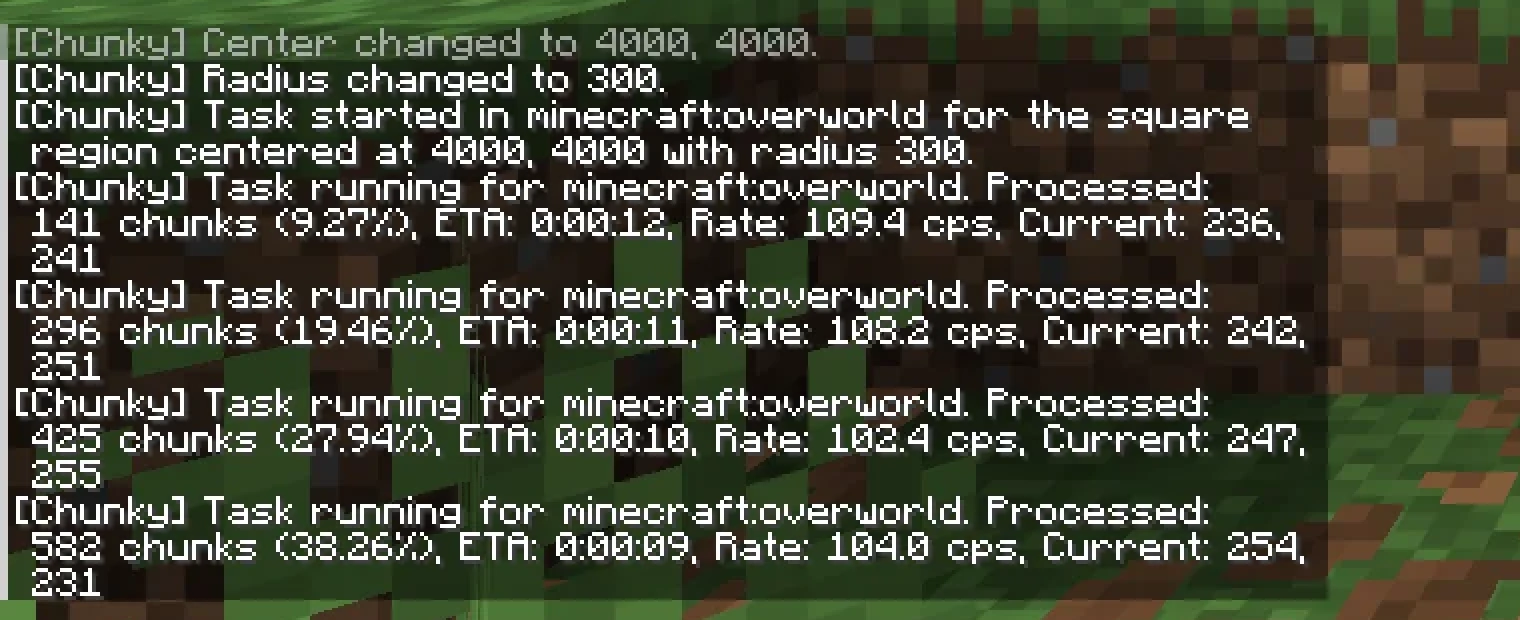
Chunky's finish message read "Processed: 4225 chunks (100.00%), Total time: 0:00:41", about 103 chunks per second on average. The background generation task completed reliably without game instability.
Before the run, the world's dimensions/minecraft/overworld/region folder held 4 MCA files totaling 2,236,416 bytes (2.13 MB). After the run it held 16 files totaling 42,901,471 bytes (40.91 MB), so the run added 40,665,055 bytes (about 38.78 MB).
Chunky 1.5.3 pregeneration benchmark results on Minecraft 26.3 Fabric.
| Metric | Measured Value | Test Condition |
|---|---|---|
| Minecraft version | 26.3 | Fabric Loader 0.19.5, Fabric API 0.162.0+26.3, Java 25 |
| Chunky version | 1.5.3 | Chunky-Fabric-1.5.3.jar |
| Memory | 6 GB (-Xmx6G) | Intel Core i3-12100F, 32 GB system RAM |
| Selection | Square, center 0, 0, radius 500 | minecraft:overworld |
| Chunks | 4,225 | From Chunky's progress and finish messages |
| Time | 42.71 s (stopwatch) / 0:00:41 (Chunky) | First run on a new world |
| Rate | About 103 chunks per second on average | Progress readings mostly 60 to 100 cps |
| Region folder | 2.13 MB to 40.91 MB (+38.78 MB) | 4 MCA files before, 16 after |
What pre-generation writes to disk
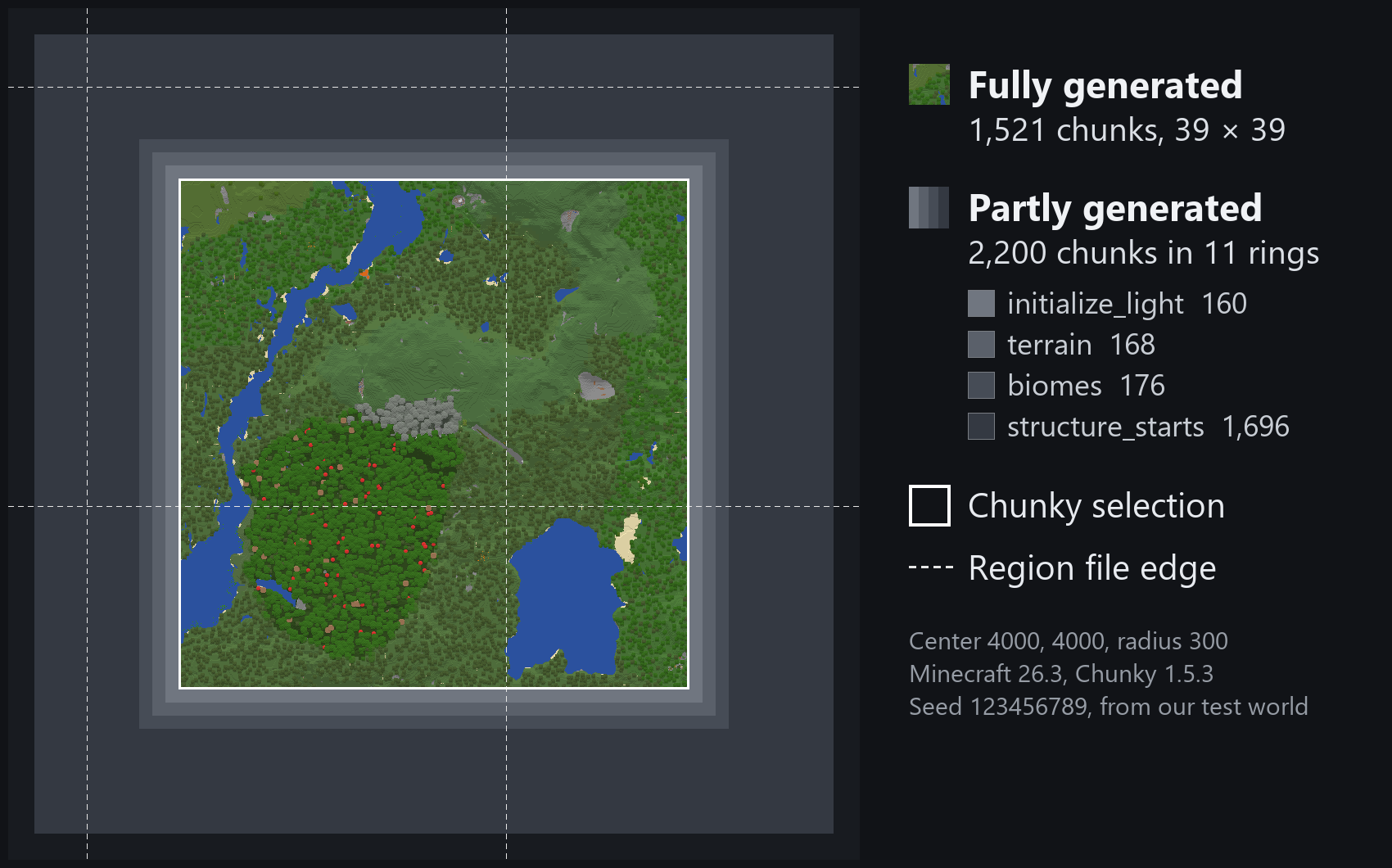
To see what a finished run leaves in the world folder, we read the region files of the separate 300-block run at 4000, 4000 and drew them from above with our own script, using the game's block textures and biome colors.
The square Chunky reported, 1,521 chunks (39 by 39), is fully generated. Around it, the files also hold 2,200 chunks that stopped at earlier generation steps, in 11 rings: one ring at initialize_light (160 chunks), one at terrain (168), one at biomes (176) and eight at structure_starts (1,696). The game saves these neighbors because a chunk can only be finished once the chunks around it have reached earlier steps.
Those rings are why this run touched 9 region files, and why the measured 500-block run took the region folder from 4 to 16 files: 65 chunks across plus 11 rings on each side spans four region files in each direction.
Controlling generation tasks: pause, continue, and cancel
Running /chunky pause halts active generation within a second and writes the current task state to config/chunky/tasks/minecraft/overworld.properties (recording the target world, center, radius, shape, pattern, and processed chunk count). Running /chunky continue resumes smoothly from that saved percentage even after a server restart.
To abort a job permanently, run /chunky cancel followed by /chunky confirm. Because cancelled tasks cannot be resumed, Chunky requires the confirmation command before clearing the active queue.
Chunky's replies in chat during the later test at -4000, -4000:
[Chunky] Task started in minecraft:overworld for the square region centered at -4000, -4000 with radius 400.
[Chunky] Task paused for minecraft:overworld.
[Chunky] Task continuing for minecraft:overworld.
[Chunky] Cancelled tasks cannot be continued. If you are sure you want to cancel, type '/chunky confirm'.
[Chunky] Cancelling all tasks.
Essential Chunky command reference
Everything in Chunky runs through the /chunky command (chunky without the slash in a server console). Here are the primary commands for configuring the generation boundary and managing active tasks:
Primary Chunky commands for selection setup and task management.
| Command | Function | Syntax Example |
|---|---|---|
| /chunky start | Starts a new generation task from the current selection | /chunky start |
| /chunky pause | Pauses the current tasks and saves progress | /chunky pause |
| /chunky continue | Continues current or saved tasks | /chunky continue |
| /chunky cancel | Stops active tasks and clears saved progress (requires /chunky confirm) | /chunky cancel |
| /chunky radius <radius> | Sets the radius in blocks | /chunky radius 500 |
| /chunky center [<x> <z>] | Sets the center block location | /chunky center 0 0 |
| /chunky shape <shape> | Sets the shape to generate, such as square or circle | /chunky shape circle |
| /chunky world [world] | Sets the selected world | /chunky world the_nether |
| /chunky spawn | Sets the center to the spawn point | /chunky spawn |
| /chunky worldborder | Matches the center and radius to the world border | /chunky worldborder |
| /chunky selection | Shows the current selection | /chunky selection |
| /chunky progress | Shows progress for all tasks | /chunky progress |
| /chunky silent | Turns update messages on or off | /chunky silent |
| /chunky quiet <interval> | Sets the interval in seconds between update messages | /chunky quiet 10 |
| /chunky trim | Deletes generated chunks outside the selected boundary | /chunky trim |
To pre-generate another dimension or use a circular boundary, set the target world and shape before starting: /chunky world minecraft:the_nether, /chunky shape circle, /chunky center 0 0 and /chunky radius 200, then /chunky start. The replies in chat, followed by the finish line from the log:
[Chunky] World changed to minecraft:the_nether.
[Chunky] Shape changed to circle.
[Chunky] Center changed to 0, 0.
[Chunky] Radius changed to 200.
[Chunky] Task started in minecraft:the_nether for the circle region centered at 0, 0 with radius 200.
[Chunky] Task running for minecraft:the_nether. Processed: 569 chunks (78.05%), ETA: 0:00:00, Rate: 196.5 cps, Current: -1, -9
[Chunky] Task finished for minecraft:the_nether. Processed: 729 chunks (100.00%), Total time: 0:00:03
Singleplayer versus dedicated server setup
In singleplayer worlds with commands enabled (or via Open to LAN), run /chunky commands directly in chat. On dedicated servers across Fabric, Forge, NeoForge, Paper, Folia, or Sponge, run commands either from the server console (without the leading slash) or in-game as a server operator (op <username>).
On a new server, generating the area around spawn before players join means early exploration loads saved chunks instead of generating them. If the progress lines in the console come too often, /chunky quiet 10 spaces them 10 seconds apart, and /chunky silent turns them off.
Practical recommendations and disk planning
Our run works out to roughly 10 KB of region data per chunk (42,901,471 bytes for the 4,225-chunk area, including what was there before). At that rate, a 2,500-block radius (about 99,000 chunks) would need on the order of 1 GB, and a 10,000-block radius (about 1.57 million chunks) roughly 15 GB. Terrain varies, so treat these as rough estimates, not measurements.
For big areas, generate in stages and run them when nobody is playing. If a server lags while players are online, /chunky pause stops the task and /chunky continue resumes it later.
Official Downloads
Created by pop495918M+ downloads
CHUNKY
We do not host any Minecraft mod files directly on this site. We link to official sources to ensure mod developers receive proper credit and support for their work.