Fabulously Optimized Modpack Guide: Vanilla Performance & OptiFine Parity
A lightweight Fabric profile delivering maximum framerates, shader support, and essential quality of life without altering vanilla gameplay.
Modpack by Fabulously Optimized team

- Minecraft versions
- 26.21.21.41.21.11.20.4
+4 moreHide versions
All 8 listed versions (releases 1.16.5 to 26.2)
- 26.x
- 26.2
- 1.21
- 1.21.4 · 1.21.1
- 1.20
- 1.20.4 · 1.20.1
- 1.19
- 1.19.4
- 1.18
- 1.18.2
- 1.16
- 1.16.5
- Loader
- Fabric
- Recommended allocated RAM
- 4 GB
- Mods in reviewed version
- 49
- Multiplayer
- Supported
Your farms, builds, and survival achievements remain completely untouched. Fabulously Optimized is a performance-focused Minecraft Java profile that accelerates chunk loading, cuts RAM overhead, restores essential OptiFine visual features, and integrates modern Iris shaders without changing base game mechanics.
In this guide8 sections
Keep Your World Untouched: The Pure Client Philosophy
Most modpacks redefine Minecraft by scattering new ores across deepslate, stocking dungeons with custom bosses, or introducing complex tech trees. Fabulously Optimized takes the opposite approach. It does not introduce a single new block, entity, dimension, or recipe. Your existing survival worlds, redstone contraptions, and community multiplayer servers remain completely unchanged.
Instead, the pack re-engineers the client underneath. Built on the lightweight Fabric loader, Fabulously Optimized replaces Mojang default rendering pipeline with modern memory management and graphics optimizations. It is designed for players who love vanilla Minecraft exactly as it is, but want three-digit framerates, zero stutter, and the visual polish popularized by legacy utility mods.
Beyond Raw Framerates: What FO Adds Over Standalone Sodium
A common question among players is whether downloading an entire modpack is necessary when Sodium can simply be dropped into a mod folder. While Sodium handles core chunk meshing and graphics rendering brilliantly, standalone Sodium covers only a fraction of what most players actually expect from a modern setup.
Fabulously Optimized builds a cohesive suite of quality of life and visual parity mods around Sodium:
- Shaders on Demand: Integrated Iris shaders allow loading modern shader packs directly without OptiFine overhead.
- OptiFine Feature Parity: Continuity restores connected glass and polished stone textures, while Entity Model Features (EMF) and Entity Texture Features (ETF) enable custom mob skins and animated models.
- Dynamic Illumination: LambDynamicLights casts realistic real-time light from handheld torches, lanterns, and burning mobs while exploring dark cave systems.
- Smooth Controls and Zoom: Zoomify provides cinematic scroll-wheel zooming with configurable easing curves, while Controlify brings native controller support.
- Memory and Logic Tuning: Lithium optimizes internal world tick logic, while FerriteCore and ImmediatelyFast reduce RAM consumption and accelerate GUI rendering.
Instead of manually hunting down dozens of individual utility JARs and troubleshooting version mismatches after every game patch, the pack maintains these interconnected mods in a tested, stable profile.
Feature Comparison: Default Vanilla vs Sodium Alone vs Fabulously Optimized
| Feature / Capability | Default Vanilla | Sodium Alone | Fabulously Optimized |
|---|---|---|---|
| Chunk Rendering & FPS | Standard Pipeline | Significantly Boosted | Maximum (Sodium + ImmediatelyFast) |
| Shader Pack Support | Not Supported | Requires Iris Manually | Built-in (Iris Pre-installed) |
| Connected Textures | Not Supported | Not Supported | Built-in (Continuity Engine) |
| Dynamic Handheld Lighting | Not Supported | Not Supported | Built-in (LambDynamicLights) |
| Smooth Camera Zoom | Not Supported | Not Supported | Built-in (Zoomify Smooth Zoom) |
| Custom Entity Models (CEM) | Not Supported | Not Supported | Built-in (EMF + ETF Parity) |
| RAM & Memory Reduction | Standard Overhead | Rendering Only | Optimized (FerriteCore + Memory Leak Fix) |
| Gamepad & Controller Support | Not Supported | Not Supported | Native (Controlify Engine) |
Optimized Defaults and Video Settings Architecture
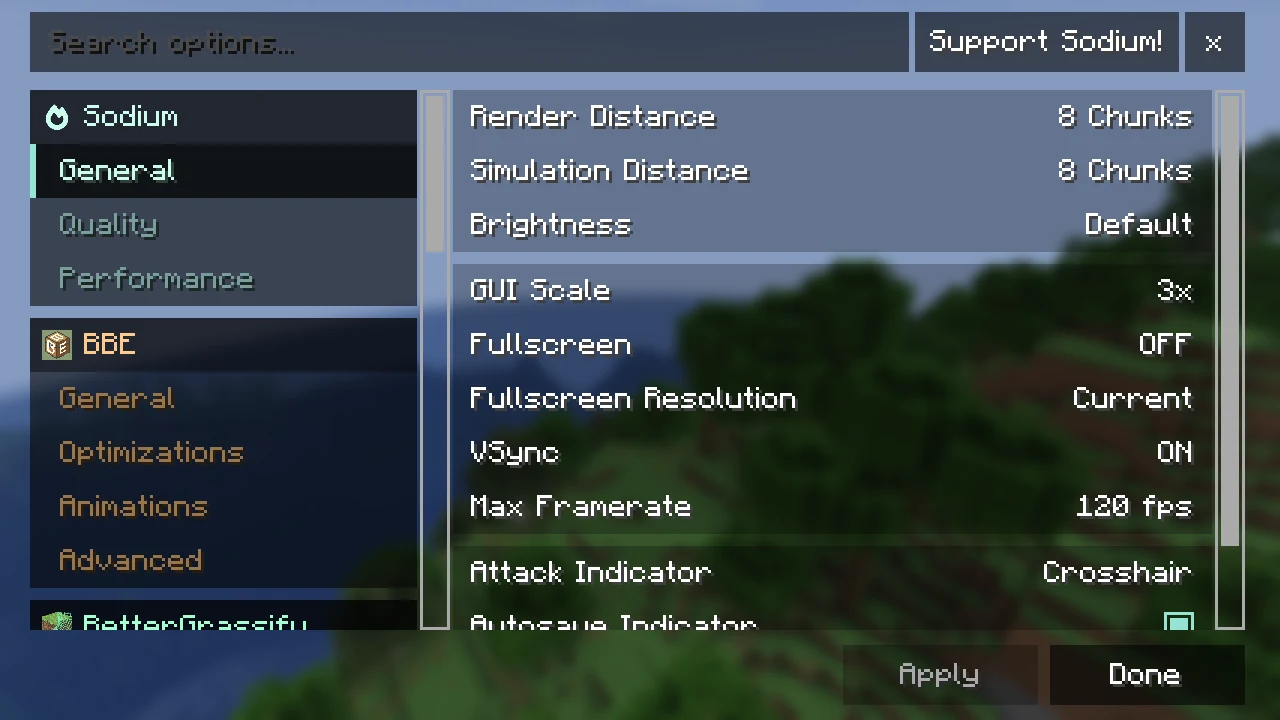
Installing Fabulously Optimized immediately replaces the standard video options with a streamlined, tabbed interface. Key rendering distances, particle limits, and graphical presets are configured for a balance between visual fidelity and responsive input.
Default render and simulation distances start at a sensible baseline, ensuring smooth chunk generation even on modest laptops and integrated graphics. Players with dedicated graphics cards can scale view distance upward or enable advanced entity culling with immediate visual feedback. The unified menu also features an integrated search bar at the top, allowing you to locate specific toggles like VSync, mipmaps, or render scale instantly without digging through submenus.
Shader Configuration and Custom Resource Packs
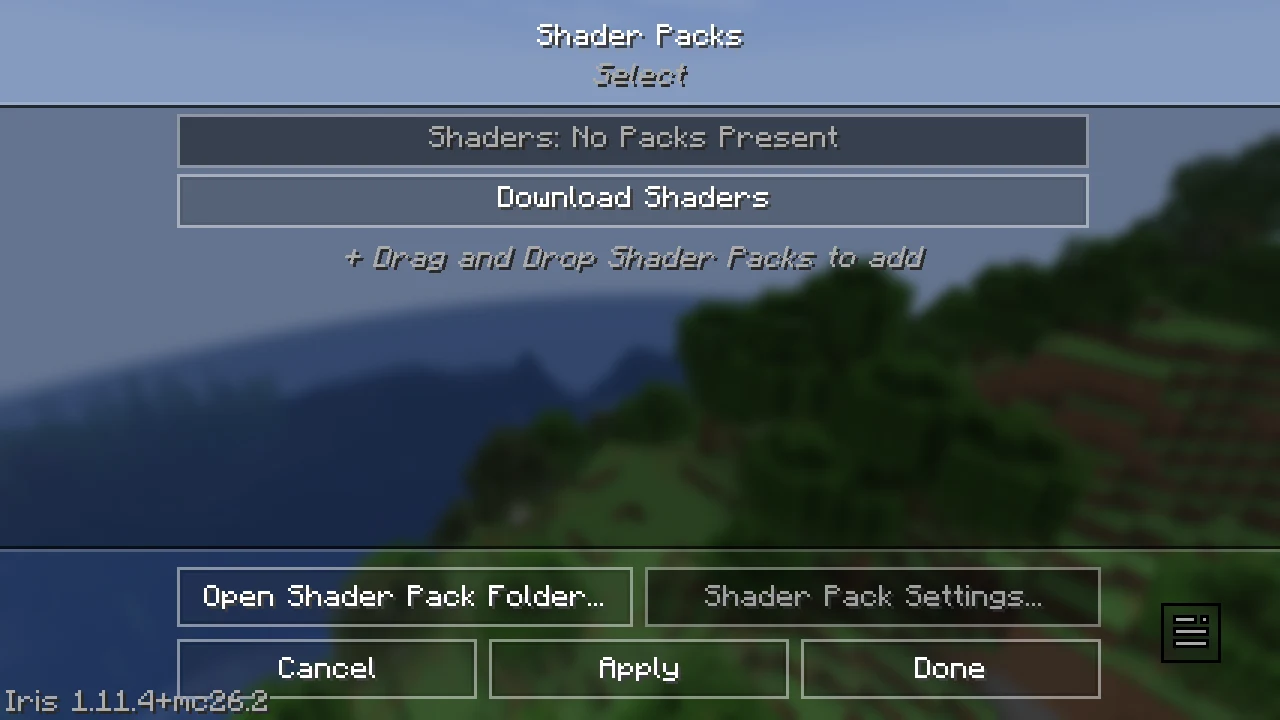
Although Fabulously Optimized includes Iris for high-performance shader rendering, the pack deliberately ships without any bundled shader ZIP files. This lightweight design keeps initial download sizes minimal and leaves artistic direction entirely up to the player.
Enabling shaders takes only seconds. In Options -> Video Settings -> Iris, you can drag any standard Iris-compatible shader ZIP directly into the window. Once applied, shaders run with full Sodium pipeline acceleration. If you are exploring visual themes, our shader reviews provide side-by-side comparisons of popular lightweight, fantasy, and realistic options to help you match visual styles with your hardware capability.
The same flexibility applies to resource packs. Because the pack includes full support for connected textures, custom skyboxes, and custom mob models, high-detail community resource packs render their specialized visual effects seamlessly without requiring OptiFine.
Multiplayer Compatibility and World Sharing
Because Fabulously Optimized operates entirely on the client, you can connect to almost any standard multiplayer server, realm, or LAN world. The server does not need to install Fabulously Optimized, Fabric, or any matching server files. You enjoy local framerate boosts and shader visuals while playing alongside friends on pure vanilla servers.
For casual cooperative play, the pack also includes e4mc. When you pause a singleplayer world and select Open to LAN, e4mc generates a temporary share link that allows friends to join your world over the internet without setting up port forwarding or dedicated hosting software.
Clean Launcher Installation and Format Conversion
The most straightforward way to run Fabulously Optimized is through a modern Minecraft launcher with built-in Modrinth support. In launchers such as Prism Launcher or the Modrinth App, simply select Add Instance, search for Fabulously Optimized, select your target Minecraft release, and let the launcher download the complete profile automatically.
For custom launcher setups or manual installations, handling raw pack files is equally straightforward:
- If your launcher accepts regular folders but not
.mrpackfiles, our MRPack to ZIP tool extracts the manifest into downloadable mods and config directories ready for manual placement. - If you maintain custom profiles exported from CurseForge with a
manifest.json, our ZIP to MRPack tool converts the export into a Modrinth-compatible package.
Using a dedicated instance ensures the pack dependencies and configuration remain cleanly separated from other modded profiles or vanilla saves.
Who Should Choose Fabulously Optimized?
Fabulously Optimized is the ideal starting point for players who want the smoothest possible vanilla Minecraft experience. It is the premier choice for:
- Players migrating away from legacy OptiFine who want higher framerates, faster chunk loading, and modern shader support.
- Survival builders and redstone engineers who want uninterrupted performance without modded block clutter.
- Laptops and mid-range desktops seeking stable framerates and lower system heat.
- Anyone who prefers a well-maintained, one-click profile over manually curating fifty separate utility mods.
If your goal is to discover new bosses, craft magical spells, or explore alien dimensions, a dedicated content modpack will better suit your journey. But if you want your familiar Minecraft world running faster, looking sharper, and feeling more responsive than ever before, Fabulously Optimized delivers exactly that.
Test setup
- Tested Release
- Fabulously Optimized 14.1.0
- Minecraft Runtime
- 1.21.4 (26.2)
- Loader
- Fabric Loader 0.19.5
- Memory Allocation
- 4 GB Allocated RAM
- Graphics Pipeline
- Sodium + Iris Engine (GTX 1660 Super)
- Native Resolution
- 3840x2160 (4K UHD) / 1280x720 UI
Official downloads
Open the creator’s page to get the modpack and its version-specific installation instructions.