
April 1, 2026
Minecraft Effect Lab: Mastering Invisible Potions and Particles
Stop letting messy circles ruin your cinematic builds with my custom effect generator for 1.21.
Hi guys! I am so excited to finally share this tool with you because, to be honest, I built this specific generator out of pure frustration. If you have ever tried to record a clean cinematic or build a high stakes RPG map in Minecraft, you know exactly what I am talking about. Those swirling, annoying potion particles are everywhere. Every time I wanted to give a player a speed boost or some strength, the entire screen would get cluttered with those messy circles. It looks unprofessional, it is distracting, and it honestly ruins the "vibe" of any custom world. I looked around for a tool that made it easy to hide them without having to memorize five different command arguments, but most of them were clunky or stuck in the older versions of the game. So, I decided to just build my own Effect Lab right here on MC Toolbox.
Why Particles are the Enemy of Good Design
In the default Minecraft experience, status effects are designed to be visible so players know what is happening to them. That is fine for a normal survival world, but when you are a creator, you want control over every single pixel. I remember working on a boss fight where the "Guardian" mob was supposed to have extra resistance. The problem was that the resistance particles made it look like a bubble machine. It completely ruined the "scary" atmosphere. I wanted a boss that was just naturally tough, not one that was clearly buffed by a command. This is why I added the "Hide Particles" toggle to our generator. By setting the "showParticles" argument to false in your /effect command, you can give anyone any power without a single bubble showing up. It is a game changer for map makers and server admins who want that sleek, polished look.
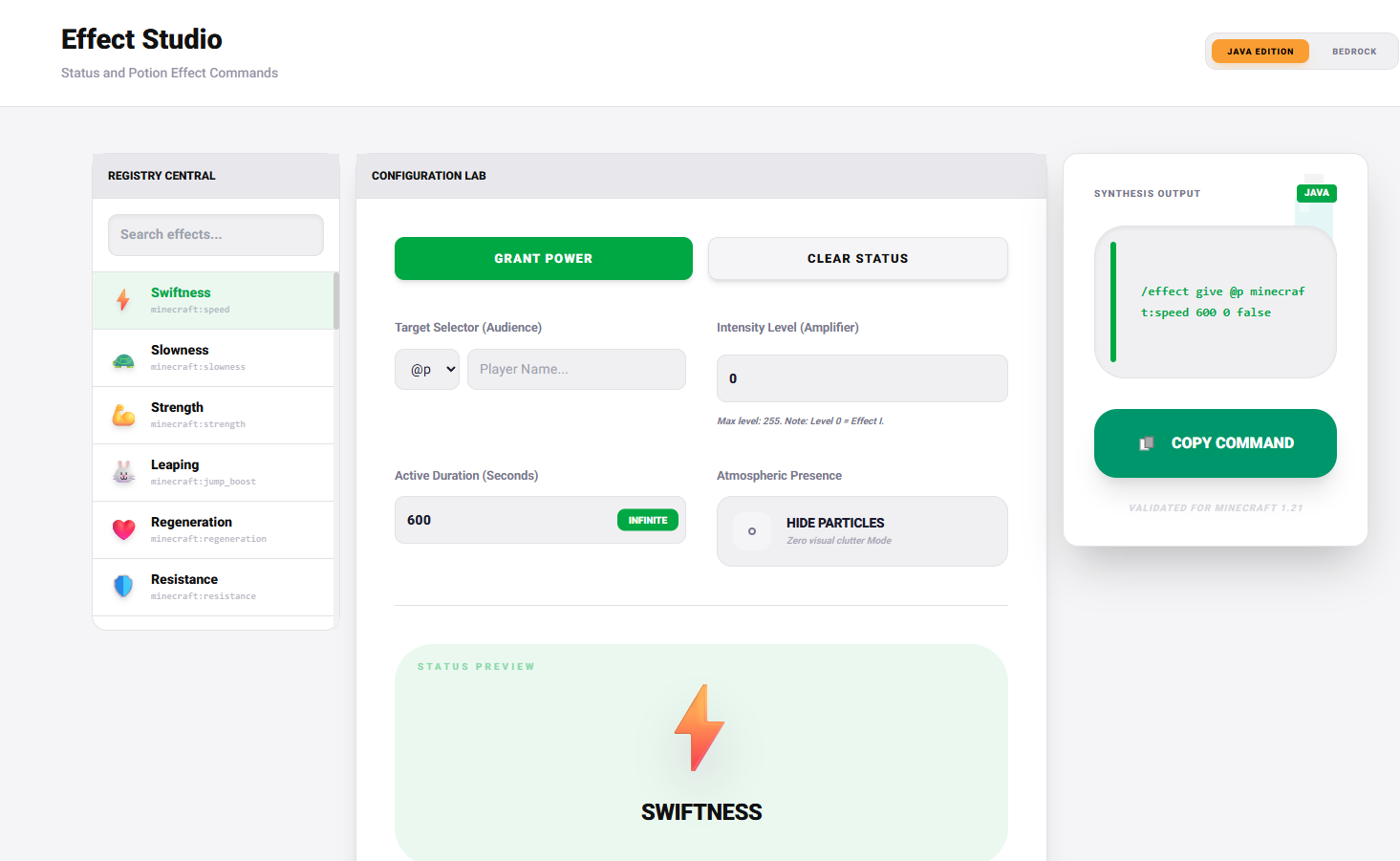
I have spent hours testing this on both players and different mob types to make sure it works perfectly in 1.21. For example, if you are making a stealth mission, you can combine a Speed II effect with Invisibility and hide all the particles. The result is a player who moves fast but is totally invisible, no swirling bubbles to give them away. This is the kind of optimization that other tools often skip over, or they make it way too complicated to find the right toggle. I wanted it to be one click, copy, and paste.
The Power of Custom Combos
Another thing that drove me crazy about other generators was how limited they were with durations and levels. Why stop at level 5 when the game lets you go much higher? I have pre-configured some of my personal favorite combos in the Effect Tool. One of my favorites is actually the "Lunar Jump" combo. You take Jump Boost at a high level, say level 6 or 7, and pair it with Slow Falling. When you jump, it feels exactly like you are on the moon. It is perfect for space themed builds or just having a blast with your friends. But here is a pro tip from my own testing, do not go too high with the Jump level. I once tried level 255 just to see what would happen, and I literally flew so high that I had time to go get a snack before my character finally landed. Keep it between level 1 and 10 for actual gameplay, otherwise, it just becomes a teleport to the stratosphere.
I also put a lot of work into the UI to make it feel fresh and snappy. I hated those old school sites that looked like they were made in 2005. I wanted something that felt sparkling and modern, just like the tools I use every day. You can now duration lock your effects to stay infinite, which is another thing I personally use for server persistent buffs. No more worrying about your players losing their night vision or haste in the middle of a dungeon.
Managing Command Syntax in 1.21
The /effect syntax of the game has changed a few times over the years, and it can be hard to keep track of if you are not a command nerd like I am. Our generator is fully updated for the latest technical changes in 1.21. We handle the 1.20+ component based syntax structure behind the scenes, so you do not have to worry about whether you need a colon or a bracket in a specific spot. You just pick your effect from the list, choose the intensity, toggle the particles, and hit copy. It is about saving time so you can spend more time actually playing and building. If you ever run into a weird edge case or a bug, please let me know, I am always updating the database to make sure it is the most accurate tool on the web for us creators.
More Guides
Minecraft 26.1 Tiny Takeover: New Features and Command Guide
Master the Golden Dandelion and everything new in the Tiny Takeover update with ...
Minecraft Enchant Guide: The Best Way to Max Your Gear
Avoid the "Too Expensive!" nightmare with my Mathematical Enchanting Lab for 1.2...
Minecraft World Navigation: Mastering Seeds and Portal Coordinates
Never get lost again with my guide to world seeds, structure finding, and Nether...
Minecraft JSON Text: Creating Interactive Chat Messages
Learn how to build clickable, hoverable, and professional chat messages with my ...