MC ToolboxMC TOOLBOX

April 6, 2026

Minecraft Color Codes: Full Guide for Chat, Signs and Items

A complete guide to Minecraft color codes and formatting codes, covering where they work, how hex colors work in modern versions, and practical usage for servers.

Minecraft has had a color code system since the early days of the game, and while the system has expanded significantly with modern versions, the core format has stayed consistent. If you run a server, build adventure maps, or want to style item names and signs, knowing which codes exist and where each one works saves you from a lot of trial and error that is common when people try to figure this out without a reference.

The Basic Color Code Format

Color codes use a section sign character followed by a single digit or letter. The section sign is the ampersand character in most server software and plugin systems, since the actual section sign is difficult to type directly. In vanilla commands like tellraw and item display names, JSON text formatting is used instead of the code system, but understanding the sixteen named colors applies to both systems.

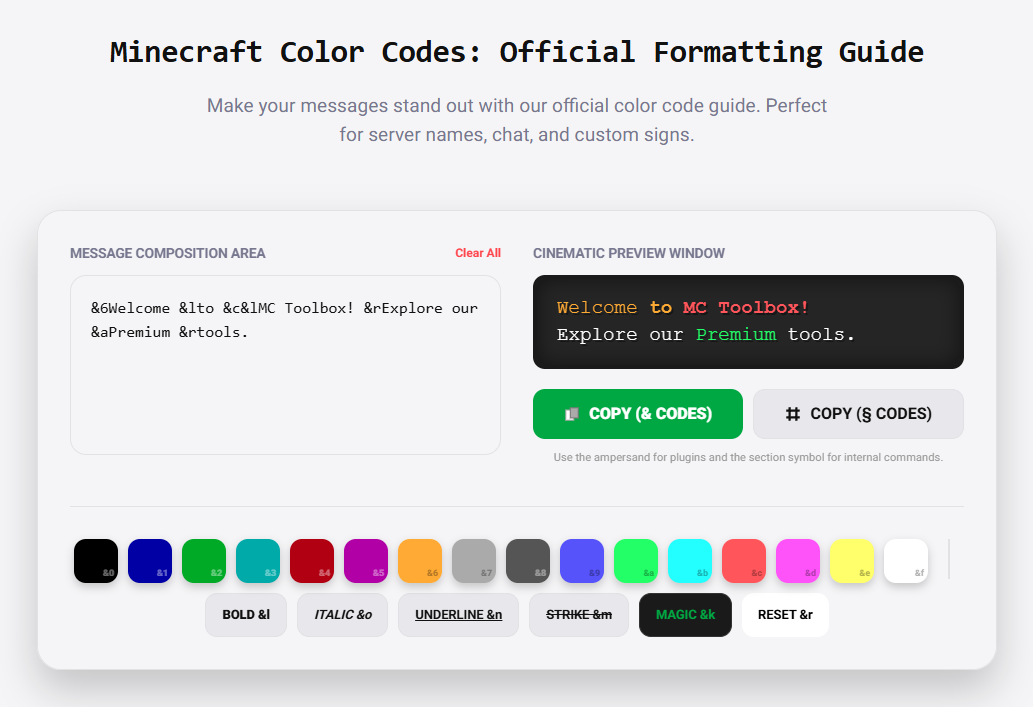
The sixteen colors cover black, dark blue, dark green, dark aqua, dark red, dark purple, gold, gray, dark gray, blue, green, aqua, red, light purple, yellow, and white. Each one has a letter or number code associated with it. The Color Codes tool at mctoolbox.net shows all sixteen with live previews so you can see exactly what each color looks like rendered in the game font before using it, which is more useful than trying to guess from a code chart what the actual color will look like on screen.

Formatting codes work the same way as color codes but control text style rather than color. Bold uses the letter l, italic uses o, underline uses n, strikethrough uses m, and reset uses r. Reset clears all active formatting and colors, returning the text to default white without styling. These format codes stack with color codes, so you can have bold red text or italic gold text without any conflicts.

Where Color Codes Work and Where They Do Not

Server chat is the most common place people use color codes, and it is also the most restricted. Vanilla Minecraft does not allow players to use color codes in regular chat. You need a permissions plugin that grants the color permission specifically, and even then it depends on the server software being configured to process the codes. On servers where it is enabled, players with permission can type an ampersand followed by a color code in chat to send colored messages.

Signs accept color codes through the game's sign editing interface in certain versions, and through commands in all versions. In 1.14 and later, you can use the data command to set sign text as JSON-formatted content with any color and formatting. For older versions or simple use cases, the ampersand code system works if the server software processes it. The distinction matters because some server setups strip color codes from sign text while allowing them in chat, or vice versa.

Item display names and lore text work through the item's name NBT tag and lore array. In commands, these are set as JSON text strings which support the full color range including hex values. On servers using plugins like EssentialsX, item names are often set through commands that accept the ampersand code system directly, which is faster to type than full JSON syntax for simple cases. The end result is the same styled item name regardless of which input method your server uses.

Hex Colors in Modern Minecraft

Java Edition 1.16 introduced support for arbitrary hex color values in JSON text, which expanded the color palette from sixteen options to over sixteen million. Hex colors use the standard six-character hex notation familiar from web development, like #FF5733 for a specific orange-red. This means you can match text colors exactly to specific design requirements rather than settling for the closest named color.

Hex color support applies to all JSON text contexts: tellraw messages, item names, book content, sign text set via commands, titles, and action bar text. It does not apply to the older ampersand code system, which only supports the original sixteen named colors. If you need hex colors, you need to use the JSON text approach rather than the shortcode approach.

The Color Codes tool provides a hex color picker alongside the standard named color reference. You can pick any color from the visual picker and it generates the correct JSON syntax for that color, along with showing you approximately how it will render. This is significantly faster than looking up hex values manually and writing the JSON by hand, especially when you need to test several colors to find the right one for a specific use case.

Practical Usage on Servers

Server owners use color codes most heavily in three areas: formatted chat messages broadcast to the server, styled item names for donation rewards or in-game shop items, and colored scoreboard displays that show player statistics or game state. Each of these has slightly different implementation depending on the server software and plugins involved, but the color values themselves are consistent across all of them.

Broadcast messages benefit from using a consistent color scheme that players recognize. If your server uses gold for important announcements and green for system confirmations, players start to parse message types by color before they even read the content. This is a small detail but it contributes meaningfully to a server feeling polished rather than improvised. Using the same color codes in signs around spawn, in formatted item descriptions, and in broadcast messages creates coherence that players notice even if they cannot articulate exactly what is making the server feel more professional.

Scoreboard text is one of the places where hex color support in modern versions has the biggest visible impact. Old servers were limited to the sixteen named colors for objective display names and score formatting. Modern servers can use colors that match a server's logo or branding precisely, which is a meaningful upgrade for servers that invest in visual identity. Setting these up is primarily a configuration task rather than a command-by-command process, but knowing which color values produce which results makes the configuration faster.

Common Mistakes with Color Codes

The most common mistake is using color codes in contexts where they are not processed. Typing ampersand-c in vanilla chat on a server without the appropriate plugin just sends the literal characters to other players. Checking whether your server supports color codes in a specific context before designing around them prevents building something that does not display correctly for anyone else.

Forgetting the reset code at the end of styled text is the second most common issue. If you apply bold red formatting to part of a message without resetting afterward, everything that follows in the same text will also be bold and red, including text from other sources that gets appended. Ending formatted segments with the reset code keeps the formatting contained to exactly the section you intended and prevents unexpected styling from bleeding into adjacent content.

Ready to master Minecraft?

Free tools and technical guides for builders, command makers, and survivalists.

Open MC Toolbox →

More Guides